PRODA is being switched off as a login method for the NDIS Commission portals. Access is moving to two systems: myID (the Australian Government's Digital ID app, formerly myGovID, which verifies you as an individual) and RAM, the Relationship Authorisation Manager, which links your verified identity to the business you represent and sets your level of access. Both must be set up, in order, before anyone at your organisation can log in.
The transition period started on 7 December 2025 and is scheduled to end on 30 September 2026. Until then you can still use PRODA for the Commission portals. After it, you cannot. The myplace provider portal moved earlier and has required myID and RAM since November 2025, so many providers are already half migrated without realising the Commission side is separate.
This guide walks the setup. For your wider registration obligations once you are in the portal, see the NDIS provider compliance pillar, and for the other deadlines landing in the same week, see NDIS changes on 1 October 2026.
Before you begin
Decide who your principal authority will be: a director or owner as recorded on the Australian Business Register, ideally someone who holds a current Australian passport (or one expired within the past three years), because that person needs the highest identity strength. Have your ABN to hand, and make sure every person who will need portal access has a personal email address and their identity documents ready. The setup has a fixed sequence, so confirming these prerequisites first is what prevents a half-finished application.
A note on who does what: a sole trader is both the individual needing access and the principal authority of the business, so you complete both the personal myID task and the business RAM task yourself. An organisation splits these across the principal authority and each staff member.
One scope note: if you are an NDIS participant with a self-managed plan, or you use a plan manager, or you use the self-managed participants portal for the worker screening database, you can continue to use either PRODA or myID. The 30 September cutover applies to providers, quality auditors and government agencies.
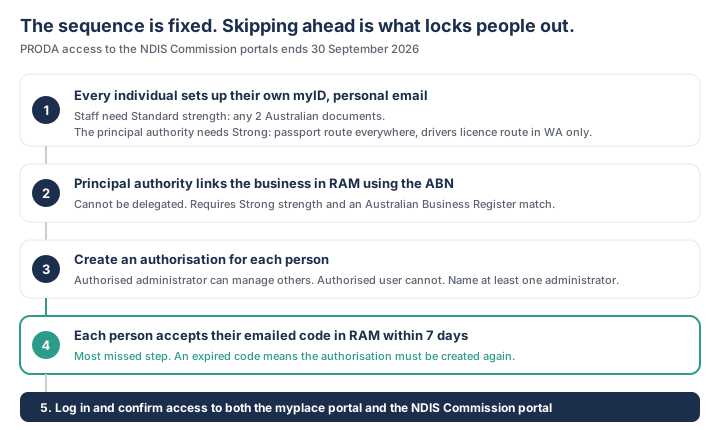
Step 1: Set up myID with a personal email
Install the myID app (iOS or Android) on each person's phone and create their myID using a personal email address, not a work or practice email. Every individual who needs portal access has their own myID; it is a personal credential, not a shared team login.
Use a personal email deliberately. A myID tied to a work address becomes unusable when the person changes role or leaves, and has to be rebuilt from scratch. When someone leaves, you remove their access by revoking their RAM authorisation, not by changing a password.
Many people already have a myID from proving their identity to Medicare, Centrelink or the ATO. If so, use the existing account rather than creating a second one.
Step 2: Reach the identity strength your role needs
myID has three levels: Basic, Standard and Strong. You start at Basic after entering your details, and you raise it by verifying documents.
Most staff need Standard. That requires verifying any two of the following Australian documents: passport (current or no more than 3 years expired), driver's licence or learner's permit, birth certificate, visa (using your foreign passport), ImmiCard, citizenship certificate, or Medicare card. The Medicare card option only appears after you have verified one of the others, so it cannot be one of your first two.
The principal authority who links the business in RAM needs Strong. There are two routes to it, and the second is not widely known:
- Using a passport (available everywhere). Verify your Australian passport (current or no more than 3 years expired) and its photo, complete a one-off face verification check comparing a selfie to your passport photo, and verify one of: citizenship certificate, driver's licence or learner's permit, or Medicare card. Note the third document: a passport and a face scan on their own are not enough.
- Using a driver's licence (Western Australia only). Verify your driver's licence or learner's permit and its photo, complete the face verification check against the licence photo, verify your Medicare card, and verify one of: birth certificate, visa (using your foreign passport), ImmiCard, or citizenship certificate.
If your named director cannot reach Strong, check whether another director can: that director can link the business and then authorise the passport-less director as an administrator. If no director qualifies, call the RAM support line on 1300 287 539 (option 3) before attempting workarounds.
Names generally must match across your documents. If yours differ because of a name change, a marriage certificate resolves it in most states and territories, and a change of name certificate works in the ACT, Northern Territory, South Australia and Tasmania.
Step 3: Link your business in RAM
The principal authority logs into RAM with their verified myID and links the business using its ABN. RAM confirms the relationship to the ABN through Australian Business Register records, so the person doing this must be recorded against the business there. This step can only be done by the principal authority, and it must happen before any staff authorisations exist.
A sole trader does the same: link the business by ABN, then authorise your own myID to represent it. That self-authorisation is a required step, not an optional one, because the worker identity and the business entity have to be formally connected in RAM before portal access works.
Step 4: Create authorisations for the people who need access
With the business linked, the principal authority (or an authorised administrator) creates a RAM authorisation for each person, at the right level.
- Authorised administrator: can act in the portal and manage other people's authorisations. The right level for a practice manager or compliance officer who onboards staff.
- Authorised user: can act in the portal but cannot manage others. The right level for clinical and administrative staff.
Authorise at least one administrator early so the director is not in the loop for every future staff change. If your principal authority is the only person who can create authorisations and they go on leave in September, that is a genuine problem.
Step 5: Have each person accept their authorisation within 7 days
This step is missed more than any other, because creating the authorisation looks like the end of the job. It is not.
When an authorisation is created, RAM emails the person an authorisation code. That code is valid for 7 days. The person must log into RAM with their own myID and accept the request before it expires. If it lapses, the authorisation has to be created again.
Build this into how you run the migration: create authorisations in small batches you can chase, rather than generating thirty at once and discovering in October that half were never accepted. Ask each person to confirm back once they have accepted, and keep a simple list of who has and has not.
Step 6: Log in, verify access, and complete the cutover
Each authorised person logs into the NDIS portal with their myID and selects the business from their RAM-linked entities. Confirm that everyone who needs access can actually reach the portals they use: the myplace provider portal (payment claims and service bookings) and the NDIS Commission portal (registration, incident reporting, complaints). If someone hits a 401 Unauthorised error after setup looks complete, clear the browser history and cookies and log in again, which resolves it in most cases.
Treat the cutover as a hard deadline, not a someday task. The transition period is scheduled to end on 30 September 2026, and the Commission has not flagged an extension. Keep the date visible with the compliance calendar alongside your other NDIS obligations.
Note the timing collision: 30 September is also the day before the 1 October SIL and platform registration lodgement deadline, and lodging a registration application requires portal access. If you are doing both, do the myID and RAM migration first, or you will arrive at the lodgement deadline unable to log in.
Once access is confirmed, move on to your registration and audit work using the register as an NDIS provider guide.
What good looks like
- Every person has their own myID, created with a personal (not work) email.
- The principal authority holds Strong identity strength, with all three document requirements met rather than just the passport.
- The business is linked in RAM by the principal authority before any staff logins.
- At least one authorised administrator exists, so staff changes do not need the director each time.
- Every authorisation has been created and accepted within its 7 day window, tracked on a list.
- Everyone has logged in successfully at least once before the September cutover, rather than on the day.
Common mistakes: using a work email for myID; assuming a passport plus a face scan reaches Strong when a third document is also required; assuming Strong is impossible without a passport when Western Australian licence holders have a second route; letting the 7 day authorisation code expire; staff trying to log in before their authorisation exists; and treating the myplace migration as covering the Commission portal, which is separate.
Frequently asked questions
When exactly does PRODA stop working for the NDIS Commission portals?
The transition period started on 7 December 2025 and is scheduled to end on 30 September 2026. Until that date you can use either PRODA or myID and RAM for the Commission portals. After it, providers, quality auditors and government agencies need myID and RAM. The myplace provider portal is separate and has required myID and RAM since November 2025.
What is the difference between myID and RAM?
myID is your personal verified digital identity, held in an app on your phone and tied to your personal email; it proves who you are. RAM (Relationship Authorisation Manager) connects your myID to a business and sets your level of access when acting for it. Both are required: myID alone does not grant portal access, and RAM cannot work without a linked, verified myID.
What documents do I need for Standard identity strength?
Any two of: an Australian passport (current or no more than 3 years expired), driver's licence or learner's permit, birth certificate, visa (using your foreign passport), ImmiCard, citizenship certificate, or Medicare card. The Medicare card option only becomes available after you have verified one of the others, so it cannot be your first document. Names generally need to match across documents.
Can I reach Strong identity strength without an Australian passport?
Only in Western Australia. The passport route (available everywhere) needs your passport, a face verification selfie, and one of a citizenship certificate, driver's licence or Medicare card. The Western Australian route uses your driver's licence and its photo, a face verification selfie, your Medicare card, and one of a birth certificate, visa, ImmiCard or citizenship certificate.
What if our principal authority cannot reach Strong identity strength?
Check whether another director can. They can link the business in RAM and then authorise the original director as an authorised administrator, which does not require Strong. If no director qualifies, call the RAM support line on 1300 287 539 and select option 3 before attempting any workaround, because the business linking step cannot be delegated.
How long is a RAM authorisation code valid?
Seven days. When an authorisation is created, RAM emails the person a code, and they must log into RAM with their own myID and accept the request within that window. If the code expires, the authorisation must be created again. This is the most common reason a migration that looked finished leaves staff locked out.
Can a sole trader use their business email to set up myID?
No. myID must be created with a personal email address, because it is a personal credential. A business email creates an account tied to the practice that fails when the email or the person's role changes. Sole traders use a personal email even though they are also the principal authority for their business, and they complete both the worker task and the business tasks.
What happens after the PRODA transition deadline?
Providers who have not completed myID and RAM setup lose access to the NDIS Commission portal, and with it registration management, incident reporting, complaints and audit documentation. Because reportable incident notifications run to statutory timeframes, losing portal access is a compliance exposure rather than an inconvenience. Complete the migration well before the date.
Do NDIS participants need to switch to myID?
No. Participants with self-managed plans, participants who use a plan manager, and users of the self-managed participants portal for the worker screening database can continue to use either PRODA or myID. The 30 September 2026 cutover applies to providers, quality auditors and government agencies.
Who do I contact if I am still locked out after setup?
For the myplace provider portal or payment-related access, contact the NDIA on 1800 800 110. For RAM itself (business authorisation or identity strength), call 1300 287 539 and select option 3. For NDIS Commission portal access, contact the Commission on 1800 035 544. If you see a 401 Unauthorised error after setup looks complete, clear your browser history and cookies before calling, as that fixes it in most cases.
Part of
NDIS Provider ComplianceLast reviewed